
(Or: "What do you mean you pay each other Bitcoin for posting content you enjoy instead of paying the WEF $8 a month for a tick?")
What is this Nostr thing anyway?
Nostr is an acronym for Notes and Other Stuff Transmitted by Relays.
It is a decentralised, federated network made up of servers relaying information to and from users and exchanging it with each other. Because most people use at least ~10 relays, their profiles and posts are distributed across them, and branch out even further when other users interact with them if they have relays you don't.
This is simple by design. It is built on top of simple webservers passing information to each other rather than reinventing the wheel with a new protocol. Since it's built on existing battletested infrastructure, the basis is sound and the fun can begin right away.
Nostr is often referred to as social media, which isn't untrue, but it's also much more. It is effectively a neutral protocol that can be used for anything, much like the internet itself, but inherently decentralised and built from the ground up with integrated encryption.
Encryption? Yes. Unlike Twitter or Mastodon, you do not create an account with your email and password. You create a cryptographic keypair. Kinda like PGP, Keybase, or Session. You get a public key that identifies you, and you get a secret key that acts as authentication. That secret key is your "password" and the only way to access your account, so keep it safe and secure!
Does that mean you have to give people a long string of letters and numbers before they can follow you? No! Instead you create a NIP-05 identity that's formatted like an email address. Sometimes these also work as Bitcoin Lightning addresses, meaning they can be used to send Bitcoin through the Lightning Network to you.
Why is that? Because part of the time honoured custom in Nostr society is "zapping sats", in other words sending small amounts of Bitcoin to each other for providing interesting, informative, or amusing content, or just for fun, or because it's a zapathon.
But I'm getting ahead of myself. One thing at a time.
Let's get you set up with a key first, shall we?
Making a new Nostr account
As I mentioned above, this isn't technically an account in the traditional sense. It's a cryptographic keypair like a PGP key but shorter and easier to use. It means you truly own your identity. It's actually exactly like a non-custodial cryptocurrency wallet, because after all, cryptocurrency is also based on public key cryptography (your wallet addresses are public keys).
If you're using Android, install Amethyst or Plebstr.
Amethyst is the most popular and most feature packed and actively developed Nostr client for Android but it can still be a little rough around the edges on occasion and has a lack of customisability.
Plebstr is available for both Android and iOS and has a very nice slick interface, but it's the new kid on the block so it needs more development to fill in some feature gaps at the time of writing. It's also closed source.
Speaking of iOS, the most popular client is Damus but here too there are iOS exclusive rapidly evolving newcomers adding new features all the time such as Nos.
There's also a multiplatform client called Iris, but at the time of writing it's not well optimised for mobile - the apps are more of a "browser inside an app" type thing, for now at least.
On the desktop, loading up Primal in the browser is excellent with a slick interface, but like Plebstr it's new and still under development so missing some features, but they're being added rapidly!
Snort is a popular choice for the desktop browser too. It's also got a modern UX.
If you login to a web client, you should use a NIP-07 extension such as nos2x. This is kind of like MetaMask for Nostr. You store your private key in it so it generates a signature to authenicate you on websites, and this way you don't need to provide them with your private key. Having to paste your private key into websites would be like having to put your seedphrase into Uniswap or Opensea.
You are of course not limited to only one client. You can try the different options and see which you like best. You can have different ones for different devices.
Just make sure you transport your private key safely when signing in across multiple devices. Pasting it into a text document on a USB stick is a good option (if you remember to delete it after) since it doesn't get stored on any servers that way. You can also send an encrypted email or other message with PGP, Keybase, Signal, OnionShare, really any type of strong end-to-end encryption.
If you're not familiar with those, a very easy way that'll work on anything with a browser is the encrypted pastebin. Just paste the key, make sure the expiary is set for a short time and "burn after reading" is ticked, then hit submit and send yourself the link. The encryption is done in your browser and your link is the only key to open it, and the note is deleted automatically once you do.
Putting it on a USB stick or encrypting locally using software on your machine if sending it online are the best options, but the pastebin is easy and fast while still providing end-to-end encryption. I encourage you to use one of the more secure options if you can however!
Getting started
So you've downloaded the app of your choice, generated your keys, and... you now sit in awe at the majesty of the blank screen before you. A canvus yearning for life. So how about we give it some?
Here's some good accounts to follow:
- Me, Myself, and I
- Bitcoin Archive
- Quotes Bot
- Edward Snowden
- Jack Dorsey
- Seth for Privacy
- fiatjaf
- PABLOF7z
- Derek Ross
- Semisol
- iefan
- Maybe: Daniel
- utxo
- Amanda Wolf
- Karnage
- Andrew
- milijan
- Vitor Pamplona
- Michael Dilger
- Renegade Butcher
- Zach
- Don't ₿elieve the Hype
- Neo
- rakan
- Boston Wine
- Phil
- Cyph3rp9nk
- freecritter
- glhf
- Alan ₿ Watts
- nym
- Blake
- walker
- quentin
- D
- TheSameCat
- sondreolav
- Ryan
- Nosnevets
- LibertyImp
- lukeonchain
That's a good mix of high profile individuals IRL, prominent developers within the Nostr and Bitcoin communities, and just some chill people I follow.
You can additionally check if people you follow on Twitter and other social media have entries in the Nostr Directory.
If you know me on Nostr and don't see your name on the list, I currently follow over 500 people on Nostr, it's hard to remember them all! And my name is Xanny, did you expect me to have a good memory? Seriously though, I'll likely come back and add to this list as I remember more chill plebs.
Why did I just call people I follow plebs? It's a term of endearment in the Bitcoin community. It comes from the #plebchain hashtag, which is just a way of saying that Bitcoin is for the people, as opposed to VC funded blockchains and state controlled CBDCs. It also reflects what a chill community it is, that people will happily refer to themselves as plebs. And it really is a full of great, kind, welcoming people. There's even people who dedicate themselves to being part of a "welcome committee" saying hello and offering help to newcomers, even zapping them sats.
To make sure you can follow all those great plebs and see all their posts you should make sure you have a few extra relays. Not too many because having a huge amount just uses up data, CPU, and battery. But it's always good to have a few other than the default big ones, partly because they serve as fallbacks if the big ones are down for any reason, but more importantly because it helps keep things nice and decentralised.
With the increase in Tor support - already a standard feature in Nostream, the most common backend for running a relay, and recently added to the Amethyst client on Android - it will soon become viable to simply automate running a node from your own hardware that you can access outside your own network without having to open your firewall, forward ports, or expose your IP address, just as long as you connect to Nostr via Tor in your client. This is something that will be coming soon (I'll update with links when it does) and I recommend because what's more decentralised than running your own relay from your own computer instead of having to use a big data centre somewhere?
Anyway, my relay recommendations...
Here's some good free relays to add:
- wss://relay.2nodez.com
- wss://relay.nostrgraph.net
- wss://nostr.shroomslab.net
- wss://nostr.sethforprivacy.com
- wss://nostr.fractalized.ovh
- wss://nostr.blockpower.capital
- wss://deschooling.us
- wss://freespeech.casa
- wss://offchain.pub
- wss://no.str.cr
- wss://nos.lol
- wss://nostr.lu.ke
- wss://nostr.mom
- wss://nostr.notmyhostna.me
- wss://nostr-relay.nokotaro.com
- wss://nostr-pub.wellorder.net
- wss://relay.taxi
- wss://relay.nostr.ai
- wss://relay.nostr.band
- wss://relay.nostr.bg
- wss://relay.nostr.scot
- wss://relay.f7z.io
- wss://blastr.f7z.xyz
- wss://relayable.org (requires admin approval)
- wss://nostr.cheeserobot.org
- wss://nostr.rocks
- wss://nostr.oxtr.dev
- wss://nostr.btcmp.com
- wss://nostr.ownscale.org
- wss://nostr.relayer.se
- wss://nostr.zerofiat.world
- wss://nostr21.com
- wss://nostream.megadope.snowinning.com
- wss://nostramsterdam.vpx.moe
Depending on your Nostr app, you may or may not have some of those on your list already. It usually depends on which client you created your keys from, although some clients will insert their own relays into your list after you sign in with an existing key too.
If you happen to be a member of the Orange Pill App you can add this once you open the app and paste your npub (your public key) in your profile:
- wss://relay.theorangepillapp.com
Here's some good paid relays to add:
- wss://bitcoinforthe.lol - payment
- wss://nostr.wine - payment
- wss://nostr.uselessshit.co - payment
- wss://nostr.milou.lol - payment
How do I get one of these "NIP-05" identifiers? And how do I "zap" people and let them zap me?
Plenty of ways!
So my personal recommendation is to sign up to Alby, then add your npub to your account, then the lighting address you choose can also be used as a Nostr identifier!
You can add this same address to both the Lighting and NIP-05 sections in your Nostr profile, and people can use the same address to find you on Nostr and zap you sats.
Like most people, I tend to use Nostr on my phone. Alby (currently) has no mobile app, but you can connect your account with Zeus - available on both iOS and Android - to be able to access it and use it to zap others on Nostr! The process is as easy as scanning a QR code.
If you use Amethyst you can also connect it to Alby, so you can zap directly inside the app instead of the zap option opening Zeus. You may wish to set up both, however, as Zeus gives you full functionality of a Bitcoin Lightning wallet.
Alby is a custodial service, meaning you do trust them with your coin. Uusually this is okay because you're only zapping around small amounts of Bitcoin as sats in Nostr and there's no KYC. But if you build up a larger amount, you should keep it in a non-custodial Lightning wallet such as Phoenix.
What is Bitcoin Lightning?
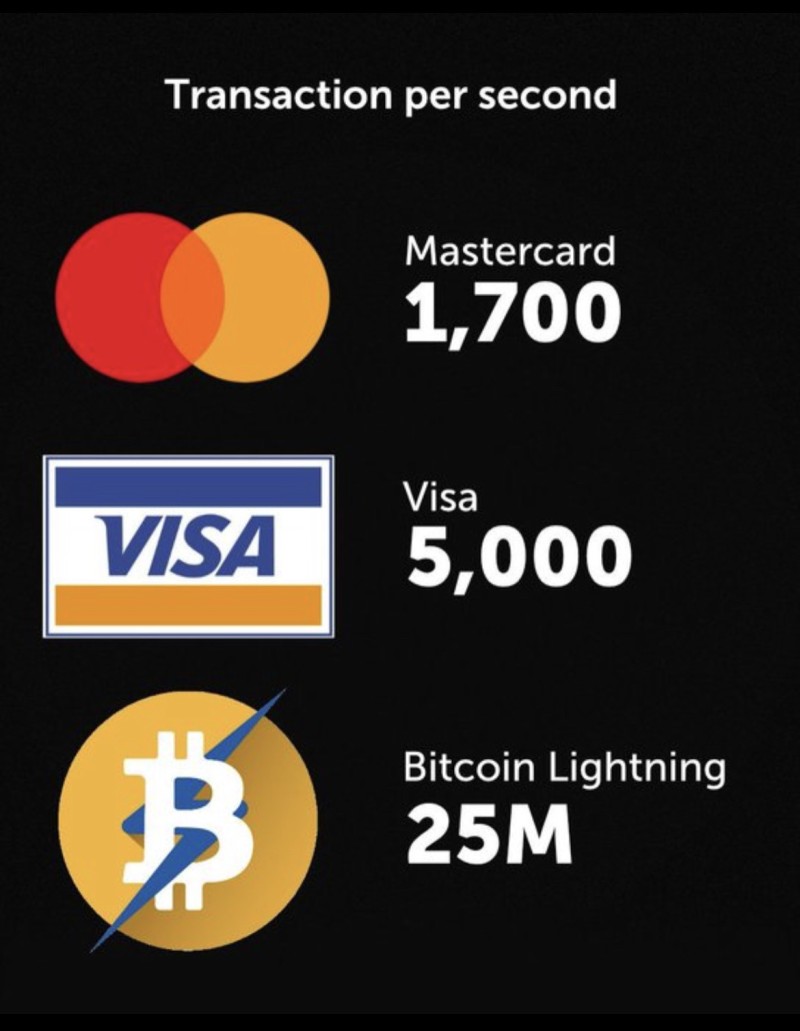
The Lightning network is a seriously impressive thing. You know how Bitcoin is legal tender in El Salvador, and people keep asking "what do they do when the blockchain fees are high and transactions take a week?" The answer is they don't tend to pay using on-chain transactions, and instead use Lightning. True to its name, transactions settle instantly, and it is capable of a whopping 25 million transactions per second, which as the image above shows, is much higher than both Visa and MasterCard... put together.
Indeed, recently I paid for a meal in a restraunt with Bitcoin via the Lightning network. Then I went to a nearby pub and paid the same way. And I've not even moved to El Salvador yet!
You can find local busineses that accept Bitcoin payments around you using BTC Map and you can either convert on-chain Bitcoin to Lightning using a service like Boltz or directly buy Bitcoin on the Lightning network for fiat, without KYC, using Robosats! I have written a guide on how to use Robosats if you're interested. It's a good old P2P market like Local Bitcoin was in the early days before every seller asked you to take a selfie while holding your ID next to your face.
I won't write a detailed section on every aspect of how Lightning works because this is about Nostr and others have already done it better than I can.
But hopefully this is enough to help you understand its benefits and how it can be used both in and out of Nostr.
Nostr's uses beyond social media
Finally, I'd be remiss if I didn't mention the great potential Nostr has for many applications outside of just being a "Twitter clone." While it is a social network, since the entire internet is pretty much based on people interacting with each other in one form or another, it is also akin to... well, the entire internet. It is a decentralised network built on top of TCP/IP. It can do anything the internet can do except decentralised and private and backed by encryption right from the start.
As an excellent example of a pioneering use of Nostr outside of social media, there is Civ Kit. It combines Nostr and Bitcoin Lightning to create decentralised P2P marketplaces. It's eBay but without all the middlemen taking cuts and you pay or get paid in... wait for it... Bitcoin!
As the homepage states:
The peer-to-peer (P2P) industry is under attack from international powers who feed off centralized fiat currencies and the control they wield. At the same time, billions of people have been relegated to non-existence. Bitcoin is the solution. Join us to carry on the work of Satoshi Nakamoto and provide the world with the ability to build unstoppable free markets.
If that tickles your cypherpunk agorist libertarian g-spot, Nostr is for you!
Many other examples are bound to be on the way and indeed are already in development, but the fact one protocol can act as both social media and a marketplace demonstrates that Nostr really is as flexible as the very world wide web itself.
Pura Vida!
Wtf am I speaking Spanish for?
Pura vida, often abbreviated to simply PV, is something you will hear commonly on Nostr. It is a common phrase used in Costa Rica. Literally translated it means "pure life" but to quote this page I found:
Pura Vida…it’s Costa Rica’s slogan, as well as being a way of life. The direct translation is “pure life” but it’s so much more than that. It’s living the good life…cherishing simple pleasures…spending time with loved ones…and enjoying a slow, relaxed pace of life.
You will find out quickly why this phrase has become widely used on Nostr as well.
And so, my friends, PV!